Why Is My Business Website Not Converting?
Getting website traffic but no leads? Diagnose 10 common conversion problems, improve your customer journey, and prioritize fixes before paying for a redesign.
If you are asking, 'Why is my business website not converting?', start with five possibilities: the wrong visitors are arriving, the offer is unclear, the page lacks credible proof, the next step feels difficult, or the inquiry journey is broken. Check the actual customer path and your measurement before buying more traffic or commissioning a redesign. A better-looking website is not automatically a better sales tool.

For most service businesses, a conversion means a confirmed inquiry, booking, or purchase, not simply a button click. This guide focuses on turning relevant visits into qualified conversations. It explains how to diagnose the bottleneck, what to change, and how to judge the result without relying on generic conversion benchmarks or promises of instant growth.
First, Confirm What 'Not Converting' Actually Means
A website with very little relevant traffic has a different problem from a website with hundreds of service-page visits and no inquiries. A site generating plenty of unsuitable leads has another problem entirely. Define the outcome you want and separate discovery, conversion, lead quality, and sales follow-up before choosing a fix.
| What you observe | What it could mean | What to check first |
|---|---|---|
| Few relevant visits and few inquiries | A discovery or targeting problem | Search visibility, service locations, and acquisition channels |
| Relevant visits but few contact attempts | Weak offer clarity, trust, or intent match | The landing page and the promise that brought people there |
| Form starts but few completions | Friction or a functional defect | Validation, required fields, mobile behavior, and server responses |
| Successful submissions but no leads received | A delivery or integration failure | Inbox routing, CRM records, spam handling, and notifications |
| Many inquiries but few suitable prospects | Poor qualification or expectation setting | Service scope, pricing context, geography, and campaign targeting |
| Qualified leads but few customers | A possible sales-process or offer problem | Response time, proposals, capacity, and reasons deals are lost |
These patterns suggest investigations, not guaranteed causes. Start by completing the journey yourself on a phone and a desktop. Submit a controlled test inquiry, confirm the success response, and verify that the lead reaches the person responsible. Label test records so they do not inflate reporting. A broken contact path takes priority over a new headline.
1. You Are Attracting Traffic That Was Never Likely to Buy
High traffic can hide a weak audience fit. An article answering a general question may attract students, job seekers, people outside your service area, or readers looking for a do-it-yourself solution. Those visits are not automatically worthless, but they should not be evaluated like visits from someone searching for a provider ready to hire.
Compare acquisition source, search queries, landing page, and qualified outcomes. A plumber serving one city should investigate whether visits come from that market and whether the searches concern services the company actually offers. Do not expect a nationwide informational article to convert at the same rate as a relevant local emergency-service page.
- Align paid campaigns and search content with the services, locations, and customer types you can genuinely serve.
- Send visitors to the most relevant landing page rather than routing every campaign to the homepage.
- Give educational readers a sensible next step, such as a related service explanation, without forcing a sales pitch into every paragraph.
- Review qualified leads by source, not just cost per click or total sessions.
If the main problem is a lack of relevant discovery, conversion design alone will not solve it. Improve acquisition and intent matching first, then evaluate the customer journey with a more appropriate audience.
Explore SEO services for relevant search visibility2. Your Main Message Does Not Explain the Offer
Visitors should be able to work out what you do, who it is for, and why the page is relevant without decoding a slogan. 'Elevating possibilities through innovation' may sound polished, but it does not help someone choose an accountant, electrician, or web design partner. Clear positioning reduces uncertainty before design adds personality.
An illustrative rewrite for a bookkeeping firm could replace 'Your partner in financial excellence' with 'Monthly bookkeeping for independent retailers in Moncton.' Supporting copy can explain the actual scope, such as reconciliations, monthly reports, and accountant-ready records. Only make promises the business can deliver, and add geographic detail when it genuinely matters.
- Name the service in language customers use, rather than relying entirely on internal terminology.
- Identify the relevant audience or problem without excluding useful prospects unnecessarily.
- Explain the practical outcome and distinguish it from a guaranteed financial result.
- Make the next step understandable before asking visitors to commit.
Ask someone unfamiliar with the business to review the opening section and describe the offer in their own words. Their confusion is a useful diagnostic, not a statistically valid conversion test. Combine it with customer interviews and evidence from actual inquiries.
3. The Landing Page Breaks the Promise That Brought People There
A visitor who clicks an ad for a bathroom renovation estimate expects information about bathroom renovations, not a general construction homepage. A search result promising pricing should lead to meaningful pricing context. When the destination does not match the promise, people must do extra work before they can decide whether to trust you.
Review the full path: search query or campaign, result or ad copy, landing-page headline, supporting evidence, and call to action. Keep the service, audience, and next step consistent. Build distinct pages when customer needs genuinely differ, not simply to repeat the same text across dozens of keyword variations.
Match the depth of the page to the decision. An urgent repair may need availability, service area, and a working phone link near the top. A considered professional service may need scope, process, examples, and pricing factors before a prospect feels ready to talk. There is no single page length or section order that works for every offer.
4. You Ask for Trust Without Providing Evidence
Statements such as 'trusted experts' and 'exceptional quality' are easy to write and difficult for a buyer to verify. Useful proof shows what the business has done, who is accountable, and what a customer can reasonably expect. It should answer the risks specific to your service rather than decorate the page.
- Show real work with relevant context: the starting problem, scope, constraints, and outcome.
- Use genuine testimonials with permission and enough attribution for credibility; respect requests for confidentiality.
- Describe the team, service area, and contact details accurately, including licences or credentials only where valid and relevant.
- Explain process, deliverables, exclusions, and how problems are handled.
- Put relevant evidence close to the claim or decision it supports.
Do not invent reviews, client logos, awards, scarcity, or numerical results. If you are new and have limited case studies, explain your process clearly, show permitted sample work, and be transparent about your experience. A specific, honest explanation is more useful than unsupported authority language.
See how strong service websites build credibility5. Your Call to Action Is Vague or Asks Too Much
A call to action should explain the next action and set an accurate expectation. 'Submit' tells someone almost nothing. 'Request an installation estimate' is more informative when that is genuinely what happens. 'Get instant pricing' is misleading if the visitor will only receive a sales call days later.
Choose a clear primary action for each page, with a secondary route when it helps customers. A visitor comparing an expensive service may want to see relevant work before requesting a consultation. Someone with an urgent problem may prefer to call. Repeating the primary action at useful decision points is reasonable; covering the screen with competing buttons is not.
Explain what happens after the click: whether a call is booked, whether someone will review the request, and what information is needed. Publish a response-time expectation only if your team can consistently meet it. Do not use fake countdowns or pressure tactics to manufacture urgency.
6. Your Contact Form Creates Unnecessary Work
Every required field should have a reason. Asking for an address, exact budget, detailed project specification, and multiple mandatory dropdowns before a first conversation may deter appropriate prospects. But stripping out all qualification can increase irrelevant inquiries. Optimize for suitable conversations, not the largest possible submission count.
- Ask for the information your team needs to respond and qualify the inquiry at this stage.
- Label fields clearly, support appropriate autocomplete, and use suitable input types on mobile.
- Explain errors next to the relevant field and preserve entered information after a recoverable failure.
- Make required and optional fields distinguishable, and describe file-upload limits before someone attempts an upload.
- Provide an accessible alternative when a third-party widget or anti-spam challenge prevents completion.
- Show a clear confirmation after acceptance and verify delivery to the inbox or CRM.
Test more than the happy path. Try an invalid email address, a slow connection, a server error, and keyboard-only completion. Check whether a double click creates duplicate inquiries. A click on the send button is an intent signal; it is not proof of a successful submission or a received lead.
7. Mobile Performance and Usability Get in the Way
A website can look excellent in a desktop mockup and still be difficult to use on a phone. Oversized media, shifting content, intrusive overlays, and sticky elements can hide the offer or block the form. Performance and accessibility problems are conversion problems when they stop customers from completing the task.
Test important pages on real phones, including the menu, calls to action, form, and booking flow. Check keyboard navigation and visible focus on desktop too. Inspect loading, responsiveness, and layout stability using PageSpeed Insights, but do not assume a perfect automated score means the experience is usable or accessible.
Look for repeated template-level problems before polishing an isolated page. Compressing a heavy shared hero image or removing a blocking script can affect many customer journeys. Use real-user performance data when available, and treat lab tests as diagnostic evidence rather than a guarantee of higher conversion rates.
Explore website performance and optimization services8. Important Buying Questions Remain Unanswered
Many visitors are not ready to make contact because they cannot judge fit. They want to understand cost, timing, scope, service area, and what happens next. Hiding every detail behind 'contact us' can turn an ordinary evaluation into an unnecessary commitment.
If fixed pricing is impractical, explain the factors that shape a quote, what an example scope includes, and what can increase cost. Use genuine ranges only when they are meaningful and current. Be clear about whether taxes, ongoing costs, or optional work are included. Honest boundaries help qualify leads instead of simply reducing the number of questions people ask.
- Who is this service suitable for, and what situations fall outside its scope?
- Which locations do you serve, and is the work delivered remotely, on-site, or both?
- What does the process involve, and what must the customer provide?
- What affects the price and timeline?
- What support, revisions, or aftercare are actually included?
Use questions from sales calls and real inquiries to improve the page. Put essential answers where the decision happens rather than burying everything in a generic FAQ. The goal is informed confidence, not a longer page for its own sake.
9. Your Tracking Confuses Activity With Business Results
Before concluding that the website is failing, make sure your reporting measures the outcome you care about. Phone-link clicks are not completed calls. Opening a scheduler is not a confirmed booking. A form event that fires before validation may count attempts that never became inquiries.
For a session-based inquiry conversion rate, divide measured sessions containing at least one confirmed inquiry by eligible measured sessions, then multiply by 100. Show the counts beside the rate. If 500 measured sessions include 10 sessions with a confirmed inquiry, the rate is 2%. That figure describes this defined audience and event, not whether the leads were qualified.
Reconcile a sample of events with accepted inquiries and downstream lead quality. Consent choices, browser restrictions, and cross-domain tools can limit analytics coverage, so document those gaps. Keep names, email addresses, phone numbers, and inquiry messages out of analytics payloads. Heatmaps or recordings, if used, require careful consent, masking, retention, and access controls.
Learn which website metrics to track after launch10. The Website Converts, but Follow-Up Loses the Opportunity
Not every lost sale is a website conversion failure. A prospect can submit a suitable request and still disappear because the reply is late, the next step is unclear, or the proposal does not address the need. Review the handoff from inquiry to response, qualification, proposal, and sale.
Assign an owner to incoming requests, check routing, and make the next step explicit. Track response times and reasons qualified prospects do not progress. Automated acknowledgments can confirm receipt, but they should not pretend to be a personal response or promise availability the business cannot provide.
Separate website inquiry generation from lead-to-customer performance. Review leads as cohorts when the sales cycle spans several weeks. Comparing this month's new inquiries with this month's sales can mix unrelated groups and lead you to redesign a website when the real constraint is elsewhere.
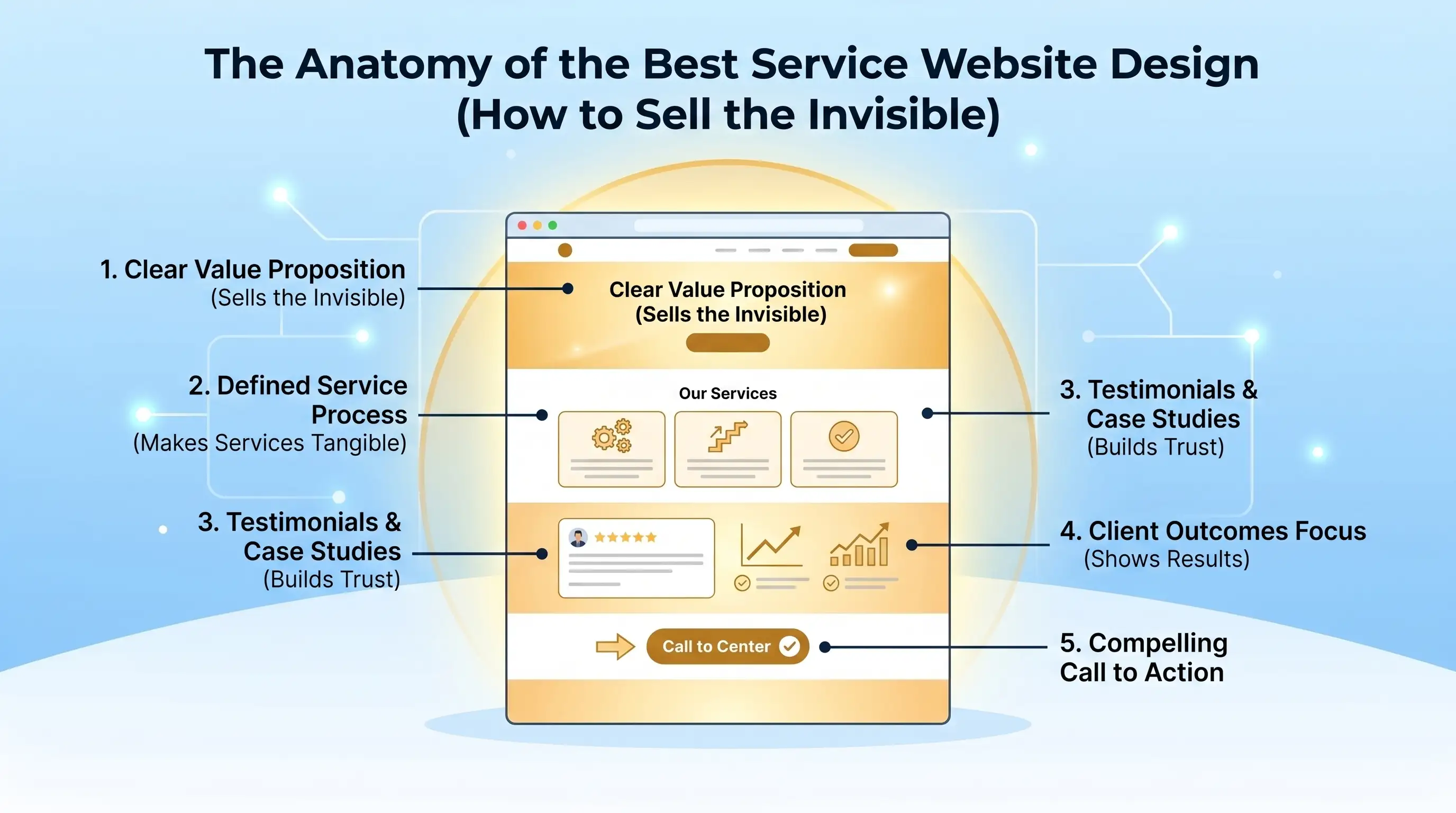
What a Conversion-Focused Service Page Should Include
| Page element | Customer question | Useful content |
|---|---|---|
| Opening section | Am I in the right place? | Clear service, relevant audience or location, and a sensible next step |
| Scope and outcomes | Can you solve my problem? | What the service includes, who it suits, and realistic benefits |
| Evidence | Why should I believe you? | Relevant work, genuine testimonials, and verifiable credentials |
| Process and pricing context | What am I committing to? | Steps, responsibilities, cost factors, and realistic timing |
| Questions and boundaries | Is there a reason this will not fit? | Honest exclusions and answers to recurring concerns |
| Contact or booking | What happens now? | A usable action, clear expectations, and a confirmed completion |
This is a decision framework, not a rigid wireframe. Put urgent information first for urgent services. Give complex purchases more context. Use descriptive headings, readable copy, and meaningful links so visitors can find the evidence they need without navigating a sales obstacle course.
A Practical 30-Day Website Conversion Improvement Plan
- Week 1. Verify the basics. Test the complete inquiry flow, confirm delivery, review the tracking definition, and record a baseline for relevant visits and qualified outcomes.
- Week 2. Identify one high-value bottleneck. Review an important landing page, its acquisition sources, customer questions, and device-specific behavior.
- Week 3. Make a focused improvement. Repair functional defects immediately; for content or design changes, document the hypothesis and the intended outcome.
- Week 4. Review the evidence. Re-test the journey, inspect lead quality, and compare suitable reporting periods while accounting for campaigns, seasonality, and measurement changes.
Thirty days is a work schedule, not a promise of statistically reliable results. Low-volume businesses may need longer to observe a useful pattern. Use controlled experiments where traffic and operational conditions support them. Otherwise, describe before-and-after changes as directional evidence, not proof that one edit caused a lift.
Prioritize by business impact, evidence, and effort. A confirmed broken form is more urgent than an untested button-color idea. A clear offer and trustworthy proof often deserve attention before adding another animation, chatbot, or popup. Keep a short change log so your team knows what changed and why.
Do You Need a Full Redesign or Targeted Fixes?
Targeted improvements are appropriate when the underlying website is maintainable and the problems are localized: weak copy, missing evidence, confusing navigation, or a specific form defect. A redesign may be justified when structural, accessibility, performance, or platform limitations repeatedly prevent needed changes. Base that decision on an audit and business requirements, not frustration with a quiet week.
If you do rebuild, preserve valuable URLs where possible, map necessary redirects, verify tracking, and test the customer journey before release. A new visual system can introduce new failures if migration and measurement are treated as afterthoughts. Define what the project is expected to improve before choosing a design direction.
Explore conversion UX audits and redesignFrequently Asked Questions About Websites That Do Not Convert
Why is my website getting traffic but no leads?
Common possibilities include low-intent traffic, an unclear offer, insufficient proof, or a difficult inquiry path. Check which pages and sources bring relevant prospects, then complete the contact journey yourself. Verify tracking and delivery before assuming the problem is page design. Traffic alone cannot tell you which of those explanations applies.
What is a good conversion rate for a small business website?
There is no universal target that makes sense for every business. A rate depends on the action, traffic intent, service price, geography, sales cycle, and tracking coverage. Establish your own baseline with a consistent definition, then evaluate confirmed outcomes and lead quality. Industry averages are context, not a diagnosis.
Will more traffic fix a website that is not converting?
More relevant traffic may help when discovery is the main constraint. More of the same unsuitable traffic will not repair an unclear offer or a broken form. Confirm that the customer journey works, then choose acquisition work based on the audience you need rather than a larger visitor total.
Should I remove pricing to get more inquiries?
Not automatically. Removing useful pricing context may increase inquiries while reducing their quality or creating avoidable sales conversations. If every project needs a quote, explain scope and cost drivers honestly. Judge the change by qualified opportunities and customer fit, not form volume alone.
Fix the Bottleneck, Not Just the Appearance
A business website converts when relevant people can understand the offer, trust the evidence, and complete an appropriate next step. Start with the actual journey, identify the most important obstacle, and make a focused improvement. No layout or optimization tactic guarantees results, but a clear diagnosis gives you a better basis for spending time and money.
If you are unsure whether the problem is messaging, usability, or the underlying website, Vantage Point can help assess the journey and prioritize the work. Explore a conversion UX audit for clarity and friction, or website development services when a broader rebuild is genuinely needed.
Get help with conversion UXExplore website development services